
3 Reasons to Choose Us
Let’s start your journey in Japan. KDDI’s stable network will accompany you on your trip
Experience 5G on Japan’s local networks.
Stay connected anywhere with KDDI’s extensive network coverage across Japan.
Enjoy unlimited mobile data with consistently high-speed connections.
3 Reasons to Choose Us
Let’s explore Japan together.
KDDI’s reliable communication network will accompany you on your journey.
Experience 5G on Japan’s local networks.
Stay connected anywhere with KDDI’s extensive network coverage across Japan.
Enjoy unlimited mobile data with consistently high-speed connections.
FAQ
- Q: How to install an eSIM
For iPhone
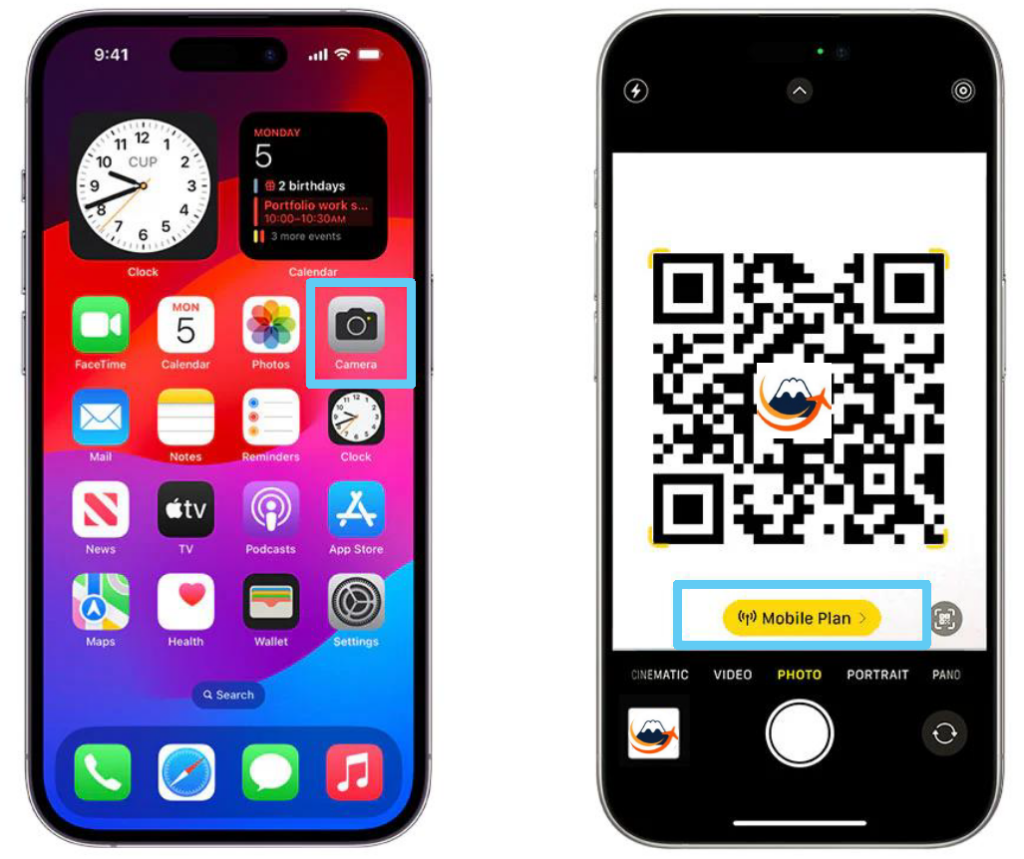
Install using a QR code
Method 1: Scan the QR code with your iPhone camera
Please scan the QR code from your camera.

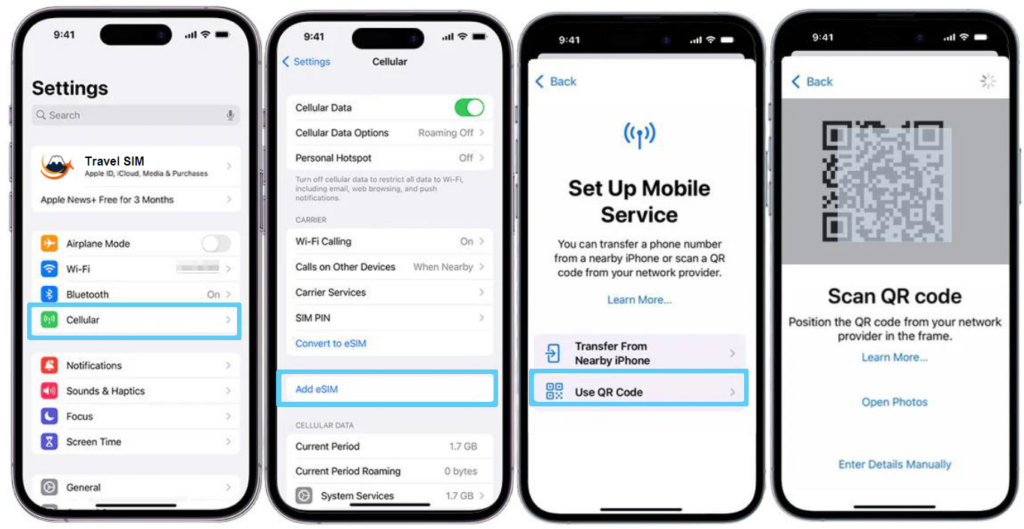
Method 2: Scan and add on the settings page
STEPOpen Settings
Tap Settings > Cellular > Add eSIM > Use QR Code.STEPScan to Add
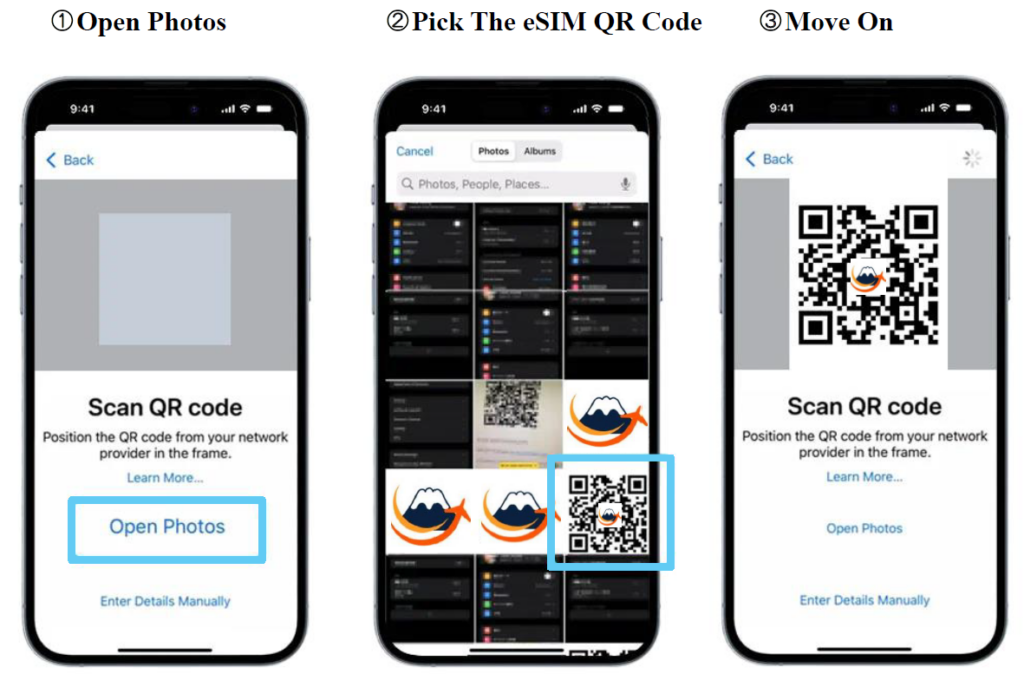
Use your phone’s camera to scan the eSIM QR code you received via email.Method 3: Add eSIM from the Photos app
STEPOpen Settings
Tap Settings > Cellular > Add eSIM > Use QR Code > Open Photos.STEPSelect eSIM QR Code
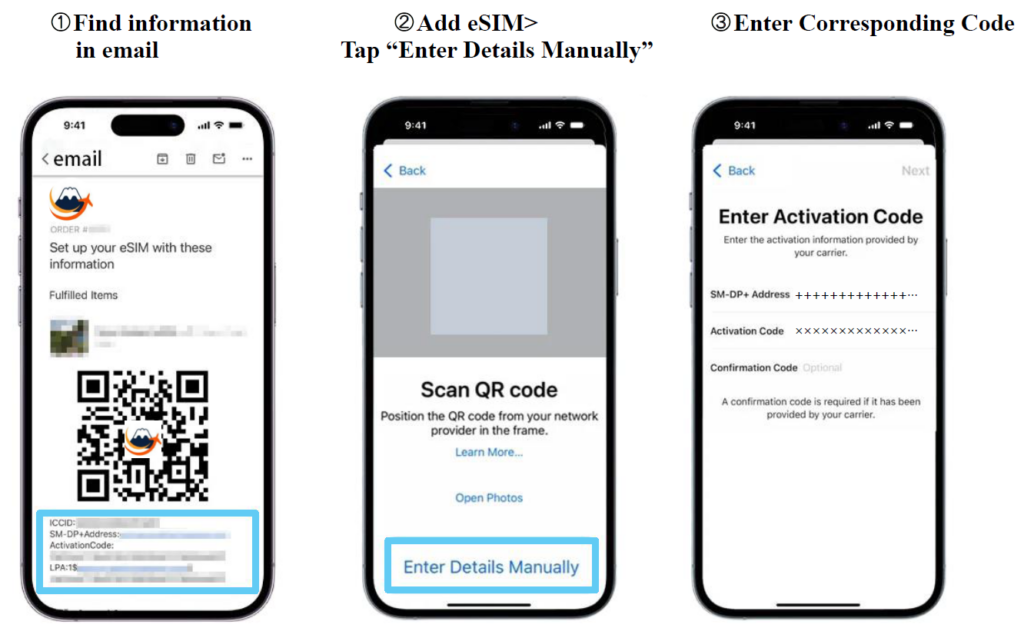
Select the eSIM QR code photo from your gallery. Your iPhone will scan the QR code and install the eSIM.Manual Installation
STEPCheck the email sent from the retailer
Check the email from the retailer that contains the eSIM information.STEPOpen Settings
Tap Settings > Cellular > Add eSIM > Use QR Code > Enter Details Manually.STEPEnter Activation Code
Enter the corresponding “SM-DP+Address” and “Activation Code.” Be careful not to include unnecessary characters such as spaces.Other eSIM Installation Methods
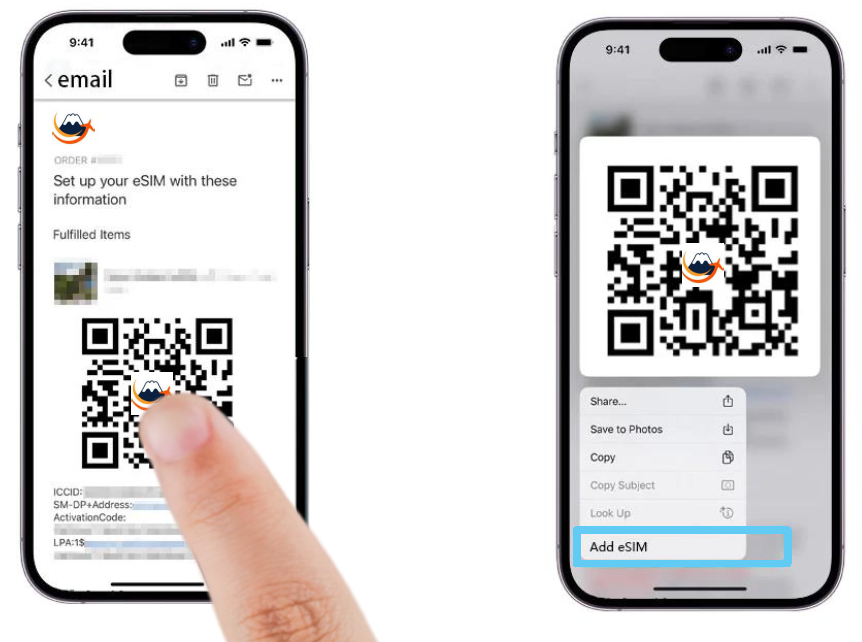
Long press the eSIM QR code
This method is compatible with iOS 17.4 and later. After ordering, the retailer will send you information about eSIM installation and activation via email. Long-press the eSIM QR code in the email and tap the “Add eSIM” option in the pop-up.
For Android
Install using a QR code
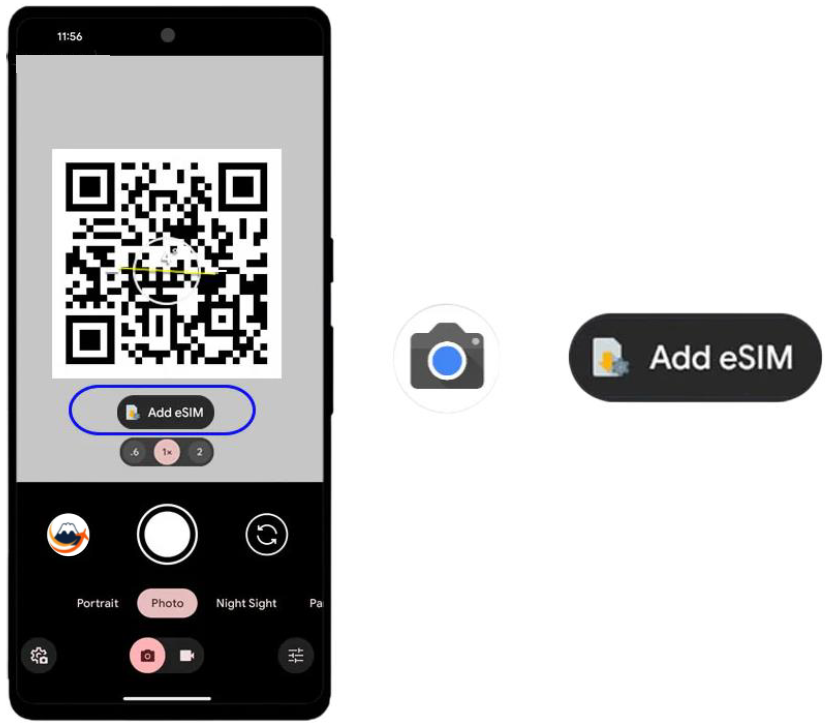
Method 1: Scan the QR code with your phone’s camera
Open the camera > Scan the QR code > Tap Add plan to your phone.
Method 2: Scan and add on the settings page
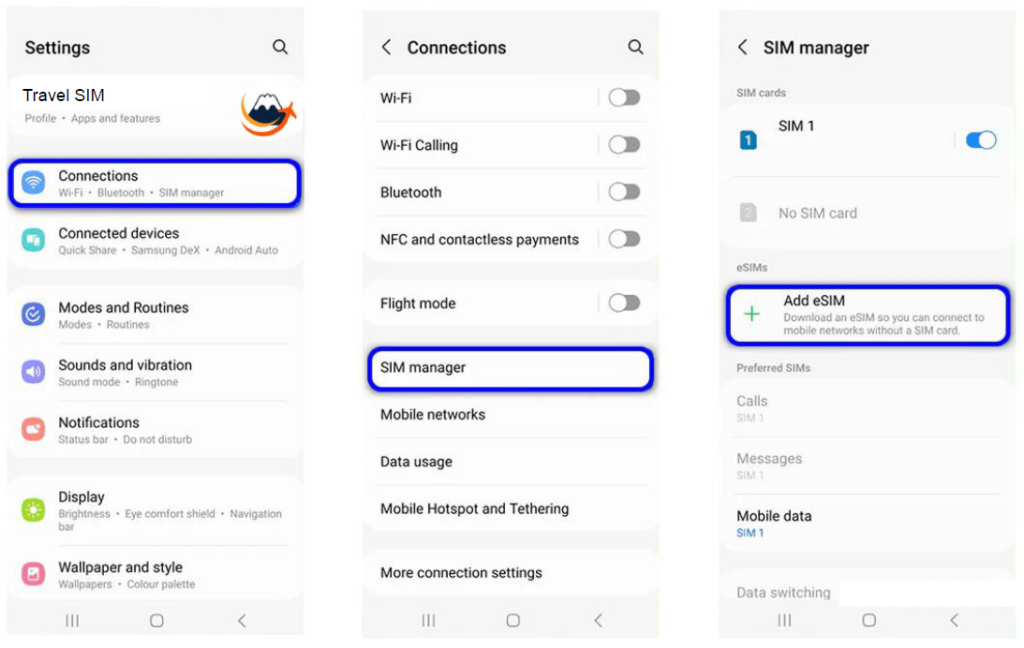
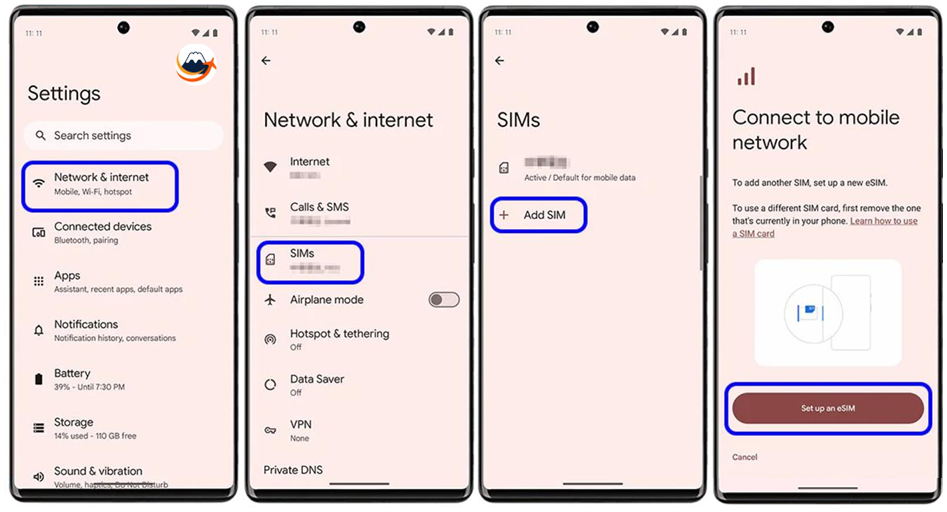
STEPOpen Settings
・Samsung GalaxyTap Settings > Connections > SIM manager or SIM card manager > Add eSIM or Add mobile plan > Scan QR code from service provider or Scan carrier QR code or Add using QR code.
・Google Pixel
Tap the + icon next to Settings > Network Internet > Mobile network or SIM.
・Other Android Smartphones
The display may vary slightly depending on the brand and model, but it is similar to adding an eSIM to a Google Pixel or Samsung Galaxy smartphone. Go to [Settings] > [Mobile Network] > [SIM Card List] > [Add eSIM]. Or, click [+] in the mobile network settings.
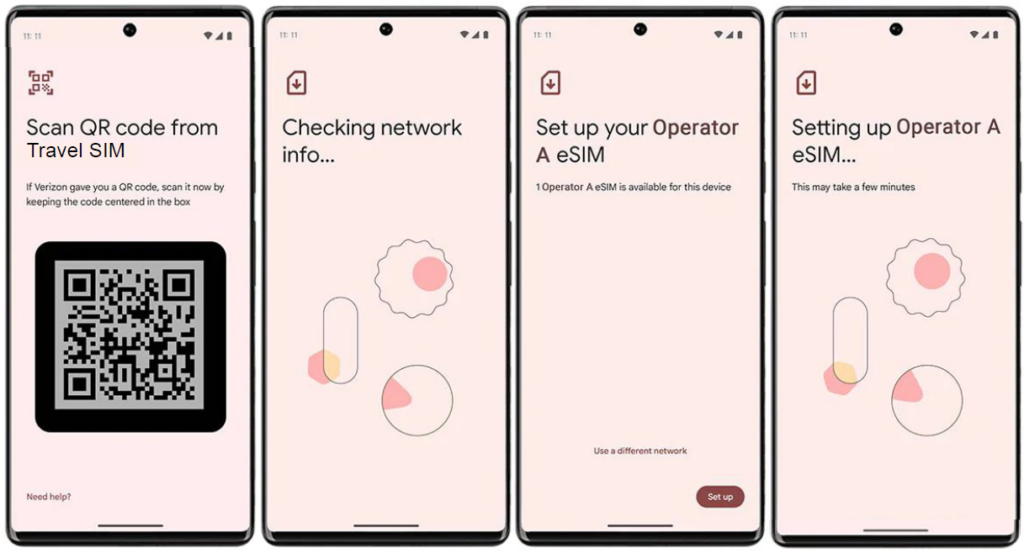
STEPScan QR Code
Tap “Download a SIM instead?” or “Don’t have a SIM card?” > “Next”. Use the scan box to scan the eSIM QR code you received via email.Sample: Google Pixel
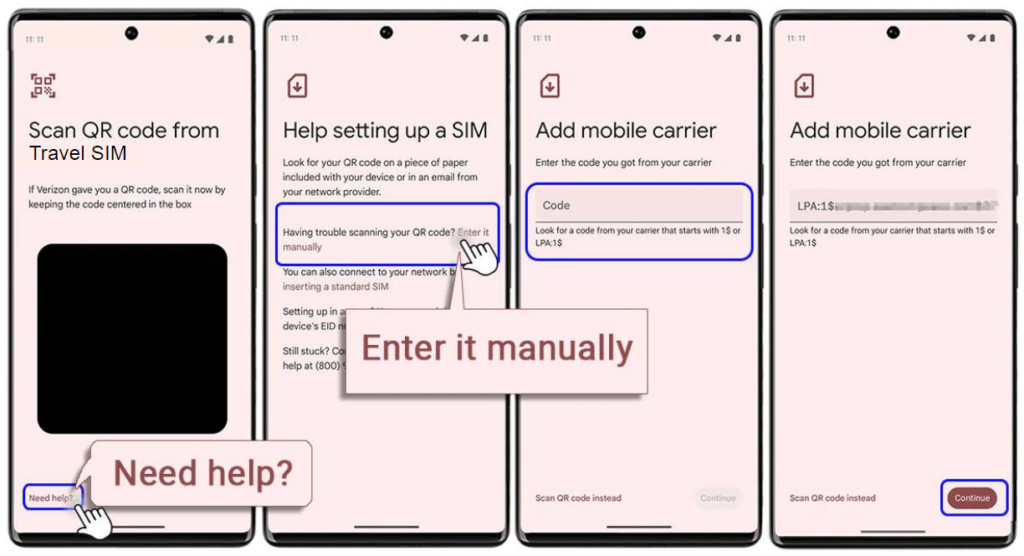
Manual Installation [Using Activation Code]
Notes
Even if you are unable to configure the communication line settings successfully, please do not delete the QR code you have registered. With eSIMs, you cannot reconfigure with the same QR code once you have deleted it. - Q: How do I check if there are any remaining VPN profiles?
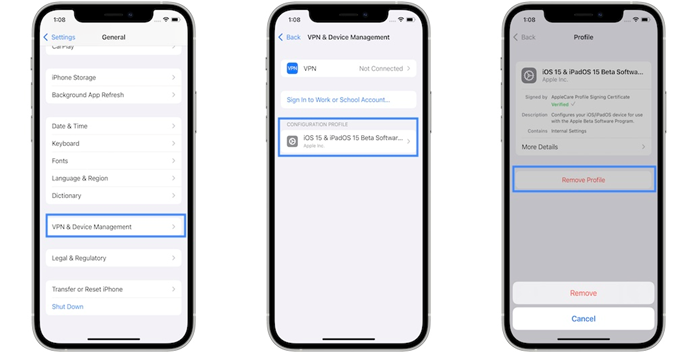
Please follow these steps to check if there are any unnecessary VPN profiles remaining:
STEPOpen the Settings app
STEPScroll down and select “General”
STEPSelect “VPN Device Management”
STEPDelete any other profiles that remain
STEPRestart your device after deleting.
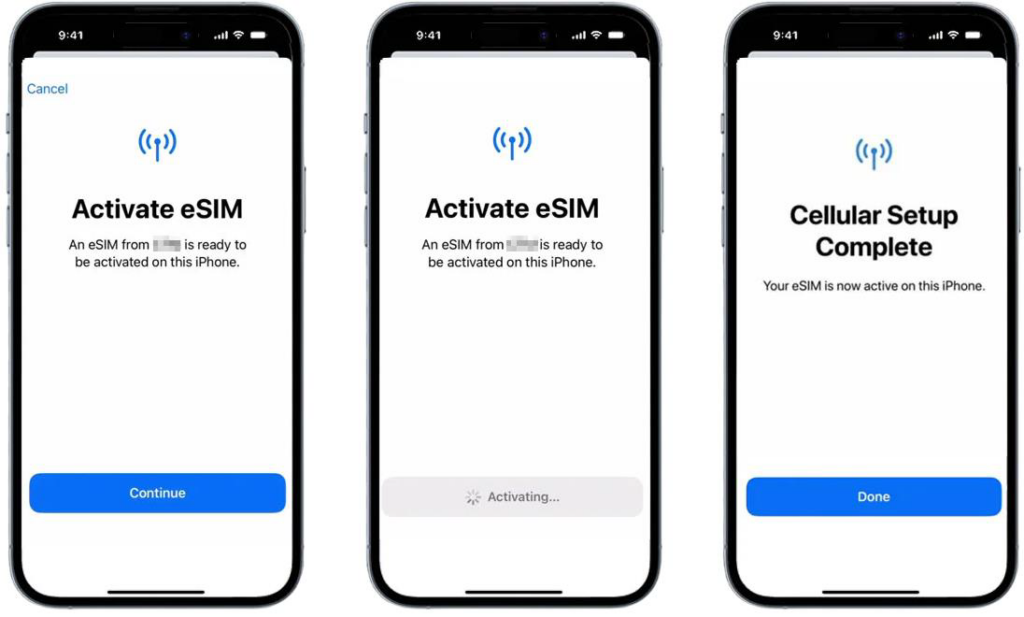
- Q: How to activate an eSIMSTEP
To activate your eSIM, tap ‘Continue’
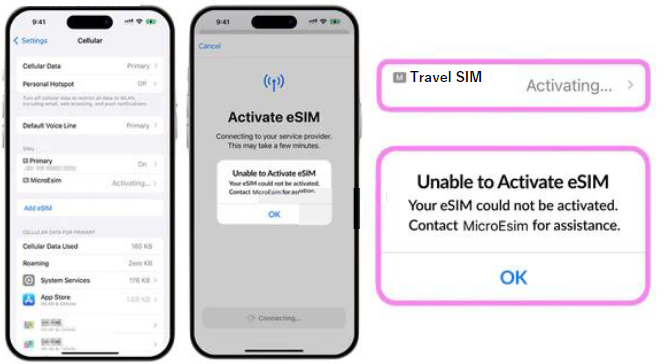
You will be directed to the eSIM activation page when you use the QR code or manually install the eSIM profile information. Just tap ‘Continue’ until the activation is complete.How to resolve ‘Activating…’ and ‘Unable to activate eSIM’
This happens when you have not yet arrived at your destination and there is no corresponding network to activate the travel eSIM. Because you have not arrived at your destination, you will not be able to connect, and after about 10 minutes, you will receive the message ‘Unable to activate eSIM’. At this point, turn off the eSIM and turn it on again once you arrive at your destination. You can also restart your phone to speed up the process, but be sure to turn off the eSIM after restarting.
Depending on the radio wave environment, the installed eSIM may display ‘Activating…’ if there is no corresponding network.How to resolve ‘This code is no longer valid’
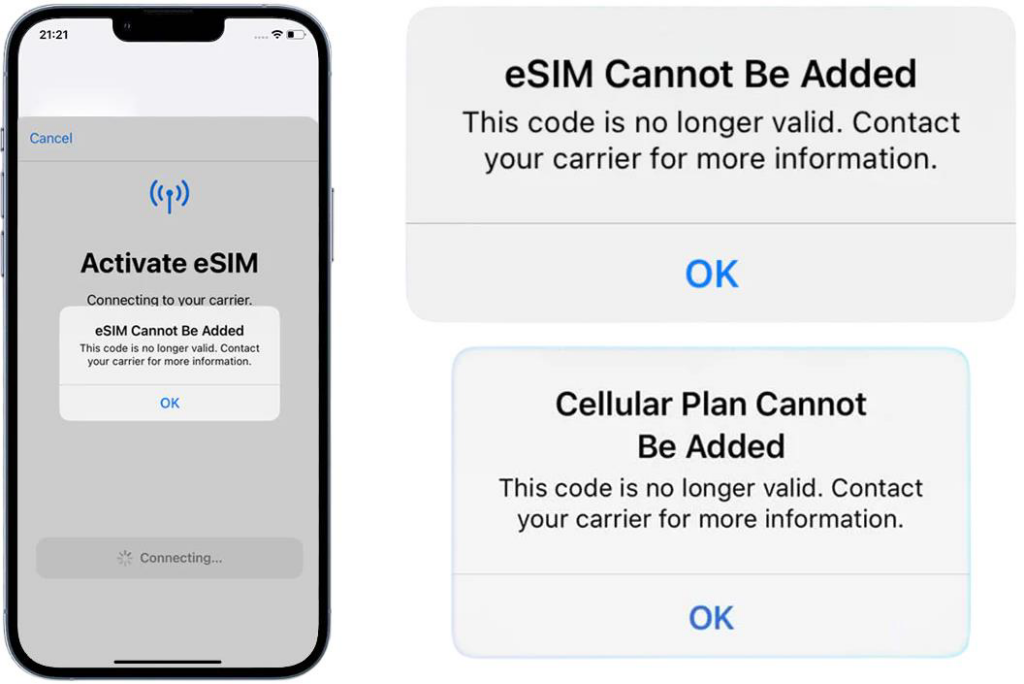
You may encounter the error ‘Cannot add eSIM. This code is no longer valid.’ In most cases, the eSIM has already been added to your smartphone and can be found in the SIM list.
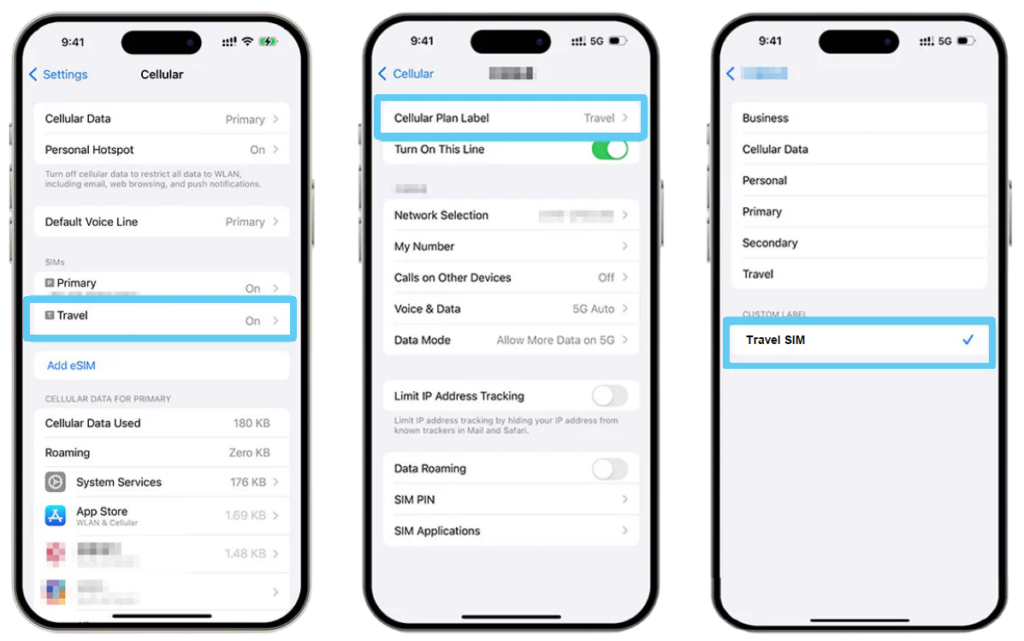
STEPSet up your eSIM label
Once you activate your eSIM, you will usually see the SIM list settings page. The newly added eSIM will appear at the bottom of the list, usually with a preset label such as ‘Travel’ by default. You can customize this at any time if you need a different label. Simply select the corresponding eSIM and rename it as you wish. Enter a custom label for this eSIM plan in the blank field labeled ‘CUSTOM LABEL’.STEPSet the default line and cellular data
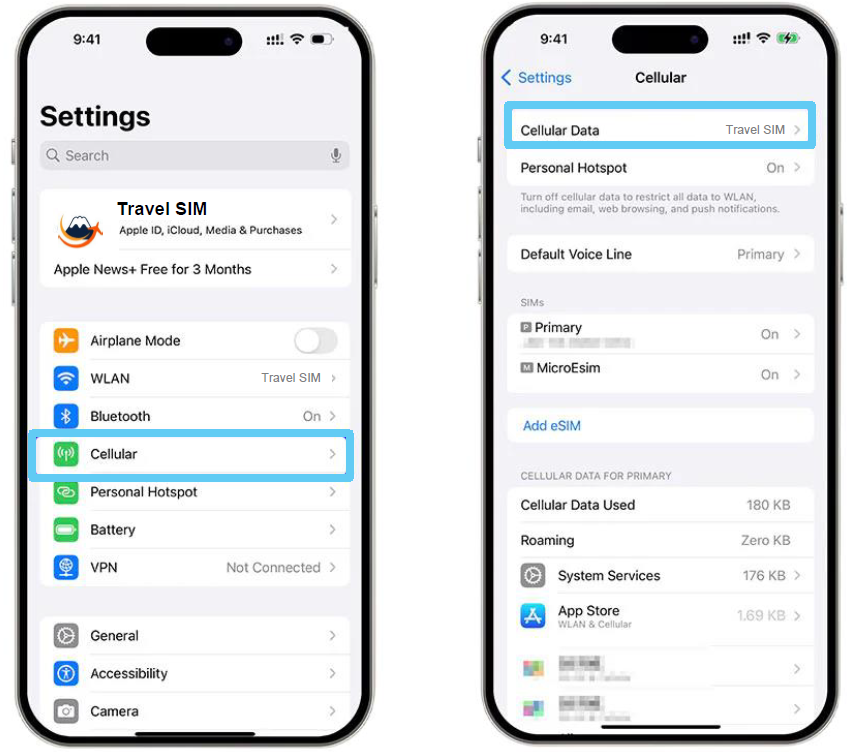
You may also see the default line settings.• Default line>>Select ‘Primary Line’.
• iMessage & FaceTime >> Select ‘Primary Line’ to keep your original number for iMessage and FaceTime.
• Mobile data>> If you have not yet arrived at your destination, select your original SIM card. Once you arrive at your destination, select the newly added eSIM. Please turn on ‘Allow Mobile Data Switching’.Note: Be sure to set the Travel eSIM as your default mobile data/cellular data line when using it.
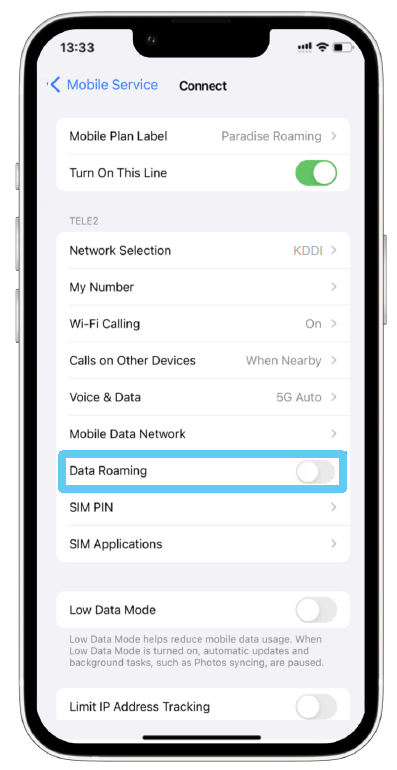
Internet connection (disable roaming)
- Q: What should I do if I see the error message “Unable to activate eSIM” when activating eSIM?
Your activation may not have completed because you are not connected to a Japanese mobile network. You can activate your device while connected to a Japanese mobile network, so please try activating it again after arriving in Japan. Please be careful not to delete it.
- Q: I would like to know the start date and end date of the SIM.
A: The SIM’s usage period begins on the first day it connects to a Japanese network.
- Q: I want to know about mobile network coverage areas.
A: We have achieved 99.9% population coverage on 4G networks and over 90% on 5G networks, providing extensive coverage across a wide area.
Area Map | Area | au - Q: Questions Regarding Changes and Cancellations
A: Please contact the retailer where you made your purchase.
- Q: About Our Refund Policy
A: Please contact the retailer where you made your purchase.
- Q: What network does the SIM card use?
A: We utilize the network of KDDI, a Japanese telecommunications company. It provides extensive coverage and stable communication throughout Japan.
- Q: Can the same eSIM be used on multiple devices?
A: An eSIM can only be used on one device at a time. Additionally, the profile can only be downloaded once.
- Q: Does it have voice functionality (phone number)?
A: This service provides data communication only. You can make calls and send messages through communication apps (such as Messenger, WhatsApp, etc.).
- Q: What is an eSIM?
A: An eSIM is a digital SIM built into a smartphone.
Depending on the device, eSIM may not be available. Please check the list below to confirm whether your model is compatible.Device List
Apple
iPhone 17, 17 Pro, 17 Pro Max, 16, 16 Plus, 16 Pro, 16 Pro Max, 15, 15 Plus, 15 Pro, 15 Pro Max, 14, 14 Plus, 14 Pro, 14 Pro Max, 13, 13 mini, 13 Pro, 13 Pro Max, 12, 12 mini, 12 Pro, 12 Pro Max, SE2, SE3, 11, 11 Pro, 11 Pro Max, XS, XS Max, XR
iPad 9th gen, 8th gen, 7th gen, mini 6th gen, mini 5th gen, Air 4th gen, Air 3rd gen, 11-inch Pro 3rd gen, 2nd gen, 11-inch Pro, 12.9-inch Pro 5th gen, 4th gen, 3rd gen
Arrows
A101 FC
ASUS
Asus ROG Phone 9, ROG 9 Pro, Zenfone 12 Ultra
DOOGEE
DOOGEE V30 eSIM 5G
Fairphone
Fairphone 4, 5, 6
Google
Pixel 2, 2 XL, 3, 3 XL, 3a, 3a XL, 4, 4 XL, 4a, 5, 5a, 6, 6 Pro, 6a, 7, 7 Pro, 7a, 8, 8 Pro, 8a, 9, 9 Pro, 9 Pro Fold, 9 Pro XL, 9a, 10, 10 Pro, 10 Pro Fold, 10 Pro XL, Fold
Hammer
Hammer Blade 3, Blade 5G, Construction, Explorer Pro
HONOR
Magic 4 Pro, 5 Pro, 6 Pro, 6 Pro RS, 7, 7 Lite, 7 Pro, 7 RS, V2, V3, Vs, 90, 200, 200 Pro, 400, 400 Pro
HTC
U12+
Huawei
Mate 40 Pro, P20, P40, P40 Pro, P40 4G, P50 Pro, Pura 70 Pro
Microsoft
Surface Duo, Duo 2
Motorola
Motorola Edge, Edge+, Edge 40 Neo, Edge 40 Pro, Edge 50 Fusion, Edge 50 Pro, Edge 50 Ultra, Edge 60, Edge 60 Fusion, Edge 60 Pro, Edge 2022, Edge 2023, Edge+ 2023, G34 5G, G35 5G, G52J 5G, G52J 5G II, G53 5G, G53J 5G, G53Y 5G, G54 5G, G55 5G, G75 5G, G84 5G, G85 5G, Power 5G (2024), Moto G Stylus 5G, G34, G35, Razr, Razr+, Razr 5G, Razr 40, 40 Ultra, 40s, Razr 2019, Razr 2022, Razr 2023, Razr 2024, Razr+ 2024, Razr 50 Ultra
myPhone
myPhone NOW eSIM
Nokia
G60, G60 5G, X30, XR21
Nuu
Nuu X5
Nothing
Nothing Phone 3, (3a) Pro
OnePlus
11 5G, 12 5G, 13, 13R, Open
Oppo
OPPO A55s, A55s 5G, Find N3, Find N3 Flip, X3, X3 Pro, X5, X5 Pro, X8, X8 Pro, X8 Ultra, Reno 5, Reno5a (eSIM), Reno 6 Pro 5G, Reno 7, Reno 9, Reno 11, Reno13, Reno13 Pro, Reno13 Pro 5G, Reno14, Reno14 5G, Reno14 Pro, Reno14 Pro 5G
OUKITEL
OUKITEL WP30 Pro, WP33 Pro
Poco
POCO M6 Pro 5G, M5, M5 Pro, F6, F6 Pro, F5, F5 Pro, X6 Pro 5G, X5 Pro 5G
Punkt.
Punkt. MC02
Rakuten
Rakuten Big, Big-S, Hand, Hand 5G, Mini
Realme
Realme 14, 14 Pro+ 5G, GT7
Redmi
Redmi Note 14 Pro, 14 Pro+, 14 Pro+ 5G, 13 Pro, Note 13 Pro+, Note 13 Pro 5G, 12 5G
Samsung
Galaxy A35 5G, A54 5G, A55 5G, A56 5G, Note 20, Note 20 5G, Note 20 Ultra, S9+, S20, S20+, S20 Ultra, S20 5G, S20+ 5G, S20 Ultra 5G, S21, S21+, S21 Ultra, S21 5G, S21+ 5G, S21 Ultra 5G, S22, S22+, S22 Ultra, S22 5G, S22+ 5G, S22 Ultra 5G, S23, S23+, S23 Ultra, S23 FE, S24, S24+, S24 Ultra, S25, S25+, S25 Ultra, S25 Edge, S25 Slim, XCover7, Z Flip, Z Flip 3 5G, Z Flip 4, Z Flip 5, Z Flip 6, Z Flip 7, Z Fold, Z Fold 2 5G, Z Fold 3 5G, Z Fold 4, Z Fold 5, Z Fold 6, Z Fold 7
Sharp
Aquos R7, R8, R8 Pro, R8s pro, R9, R9 Pro, Sense4 lite, Sense6, Sense6s, Sense7, Sense7 plus, Sense8, Simple Sumaho 6, Wish, Wish 2, Wish 3, Zero 6
Sony
Xperia 1 IV, 1 V, 1 VI, 5 IV, 5 V, 10 III Lite, 10 IV, 10 V, 10 VI, Ace III
Teracube
Teracube 2e
T-Mobile
REVVL 7, 7 Pro
TCL
TCL 40XL, 50 5G, 50 NXTPAPER 5G, 50 Pro NXTPAPER 5G
Vivo
Vivo X80 Pro, X90 Pro, X100 Pro, V29, V29 Lite, V29 Lite 5G (eSIM support only for European models), V40, V40 Lite, V40 SE, X200, X200 Pro, X Fold2, iQOO 12 Pro
Xiaomi
12T Pro, 13, 13 Lite, 13 Pro, 13T, 13T Pro, 14, 14 Pro, 14T, 14T Pro, 15, 15 Pro, 15 Ultra, 16, 16 Pro, 16 Pro Max, 16 Pro Mini, 16 Ultra, 17, 17 Pro, 17 Pro Max
ZTE
Axon 30 Ultra, Axon 40 Ultra, Axon 50 Ultra, Nubia Flip 5G, Nubia Flip 5Gs, Nubia Flip2 5G
Important Notes
*1 If your device is not listed, check the EID to confirm eSIM compatibility.
*2 This product is designed for use with smartphones and tablets. We are not responsible for any issues that may arise from installing it on other devices.
*3 eSIM compatibility may vary depending on regional models, even for devices listed.
*4 Even for listed devices, activation may not be possible due to compatibility with the KDDI network. Please check network compatibility before use.